Kinward Text Message Program
Last updated: August 25, 2026
Kinward is a scam-protection service for older adults, operated by Kinote AI Inc. Families subscribe, and Kinward screens the incoming phone calls of an enrolled older adult (a “loved one”) for the markers of a scam, alerting the family when something looks wrong.
This page describes our text message (SMS) program in full: who receives messages, exactly how they opt in, what we send, and how to stop.
Terms of Service: https://kinwardapp.com/terms.html
Privacy Policy: https://kinwardapp.com/privacy.html
Who receives messages
Only the account holder — the person who created and pays for the Kinward account — and only at a mobile number that they entered themselves and verified. We do not send text messages to a number that someone else provided on a person's behalf, and we do not send invitations, marketing, or promotions by text message.
How the account holder opts in
There is one opt-in path. It is inside the Kinward mobile app, on the account holder's own phone, after they have signed in to their own account. Step by step:
- The account holder downloads Kinward and signs in to their account.
- They open the navigation menu and tap Account.
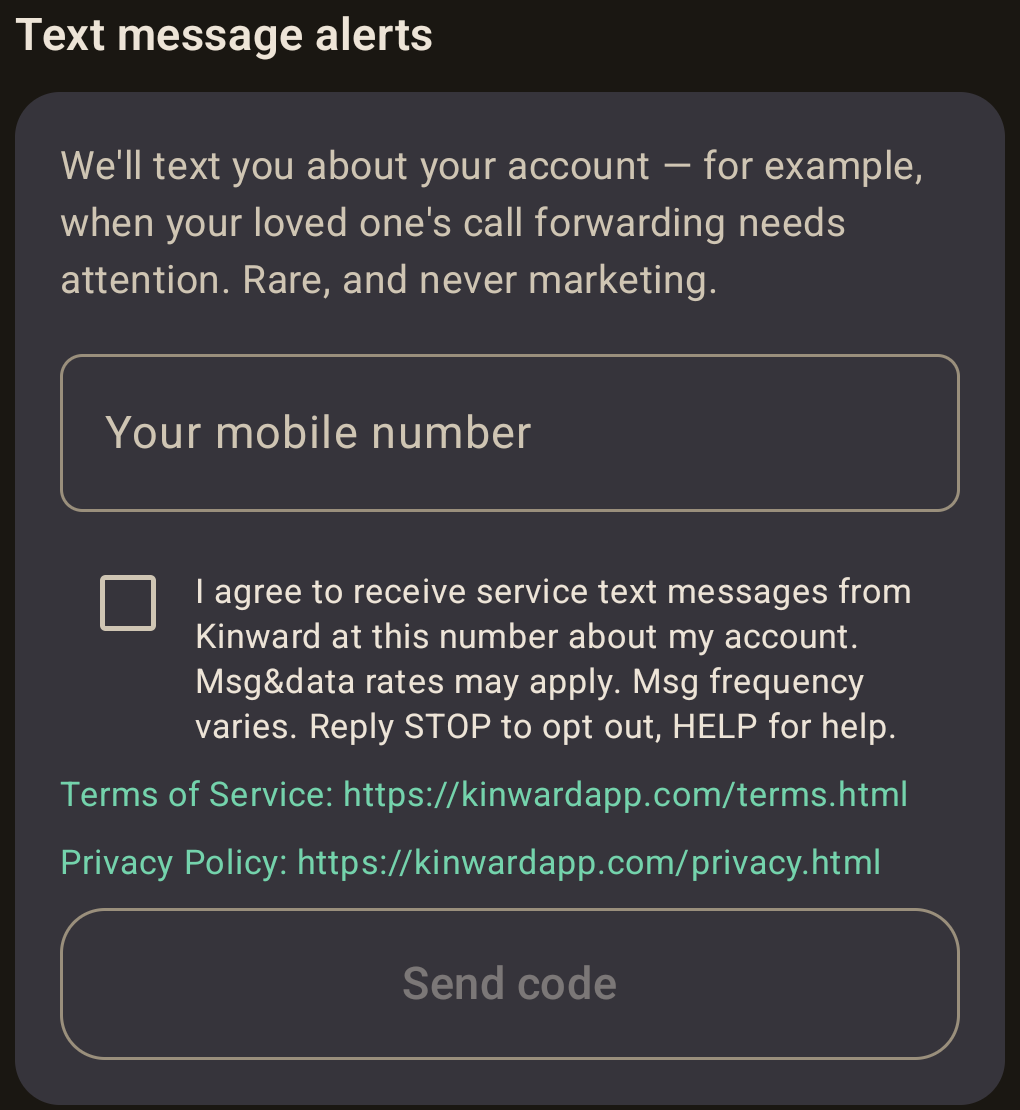
- Under the heading Text message alerts they see this explanation: “We'll text you about your account — for example, when your loved one's call forwarding needs attention. Rare, and never marketing.”
- They type their own mobile number into the field labelled Your mobile number. The field is empty by default.
- They tick a checkbox that is unchecked by default, next to this exact
wording:
I agree to receive service text messages from Kinward at this number about my account. Msg&data rates may apply. Msg frequency varies. Reply STOP to opt out, HELP for help.The Send code button stays disabled until both the number is entered and this box is ticked. Nothing is submitted and no message is sent until the account holder taps it.
- The same screen shows both policy URLs in full, directly beneath the consent checkbox, each opening its own page: https://kinwardapp.com/terms.html and https://kinwardapp.com/privacy.html.
- We record the consent — the wording shown, the number it was given for, and the date and time — and send a one-time verification code by text to that number.
- The account holder types the code back into the app. Only once the code is confirmed do we treat the number as opted in. A number that is entered but never verified is never messaged.
Consent to receive text messages is not a condition of buying or using Kinward. Every other part of the service works whether or not the account holder gives us a mobile number.
How to stop messages
Reply STOP to any message to unsubscribe from all messages. Reply
HELP for help, or email
support@kinoteai.com. The account holder can also remove
their number under Account in the app, which deletes the number and the consent
recorded with it.
Message frequency and cost
Messages are triggered by the state of the account, not by a schedule — fewer than ten messages per account per year is typical. Message frequency varies. Message and data rates may apply. Mobile carriers are not liable for delayed or undelivered messages.
What we send
Transactional service notifications and account notifications only. Examples of the actual messages:
Privacy
Mobile information and messaging consent are not shared with third parties or affiliates for marketing or promotional purposes. All of the above categories exclude text messaging originator opt-in data and consent; this information will not be shared with any third parties. Full details are in our Privacy Policy.
© 2026 Kinote AI Inc. · Privacy Policy · Terms of Service · support@kinoteai.com